
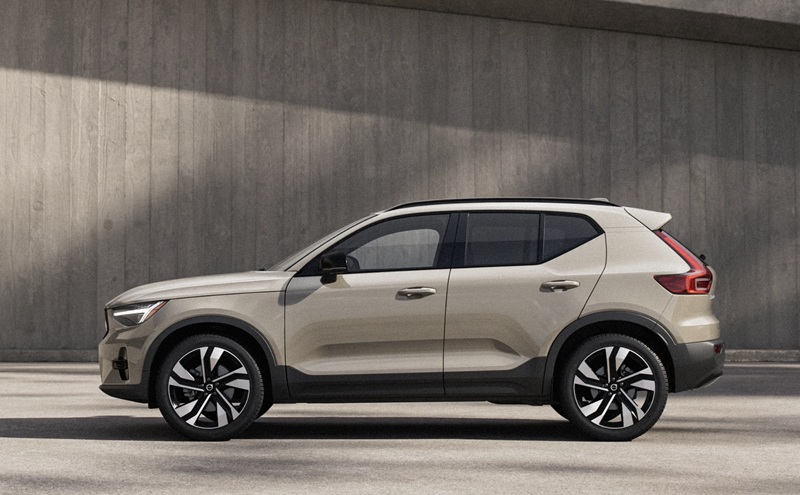
Patrick Volvo Cars - Does the 2026 Volvo XC40 have Apple CarPlay for daily drives around Elmhurst, IL?
Modern commutes feel easier when your car speaks the same digital language as you do, and that is exactly what the XC40 does with seamless smartphone integration and familiar apps. If you are wondering whether the 2026 Volvo XC40 supports Apple CarPlay for daily drives around Elmhurst, IL, the answer is an easy yes—plus more. Plug in via the USB-C port and your iPhone content appears on the 9-inch center display, where you can navigate with your preferred maps app, cue your playlists, and field messages, all while your phone charges.
What sets the XC40 apart is how naturally CarPlay coexists with Google built-in. You can favor Apple Maps one day and switch to Google Maps the next, call or text with Siri in CarPlay or say “Hey Google” for quick adjustments in the native system. The result is less fiddling and more flow because the SUV meets you where you are—no learning curve required.
How Apple CarPlay works in the XC40
Setup is as straightforward as it gets. Connect your iPhone to the USB-C port in the center console, and Apple CarPlay launches on the 9-inch touchscreen. From there, use the display or Siri to pull up directions, pick a podcast, reply to a message, or manage calls. Since the phone charges while plugged in, you can run navigation and stream audio without worrying about battery drain, which is especially handy on longer drives or when traffic slows near neighborhood schools and shopping areas.
CarPlay is also smart about sharing space with the XC40’s native displays. You still see your core driving info on the 12.3-inch driver display—speed, turn-by-turn guidance, and active driver support—while your CarPlay apps run on the center screen. It feels cohesive because everything important stays in view without clutter.
Why dual systems are better than one
Plenty of vehicles offer smartphone mirroring, but the XC40 elevates the experience with Google built-in alongside Apple CarPlay. That means if a passenger prefers to use Google Play apps, you can quickly swap to native navigation, stream a different podcast, or handle a voice request with “Hey Google.” Over-the-air updates keep the system fresh without service visits, so the features you count on continue to improve.
In practical terms, this dual approach helps when your day pivots. Maybe you start with CarPlay during a conference call, then switch to Google Maps for live rerouting around a construction detour on your way to Wilder Park or an evening event. The XC40 flexes with you, not the other way around.
What to test in person
When you stop by for a drive, bring your iPhone and a USB-C cable. That way, you can see how your go-to apps feel on the 9-inch display and how Siri plays with your routine. Then try a few native voice commands to compare. Sample audio quality with your favorite playlist, and if available, experience the Harman Kardon Premium Sound for richer clarity at lower volumes. It’s also worth toggling the 12.3-inch driver display between views to see how it presents navigation—calm and legible even when traffic ebbs and flows along York Street or Grand Avenue.
- Plug-in test: Connect your iPhone via USB-C and confirm your daily apps appear and respond quickly.
- Voice check: Use Siri in CarPlay, then say “Hey Google” to try native commands for climate, calls, or directions.
- Display comfort: Switch driver display layouts and glance at turn-by-turn prompts while keeping eyes up.
- Audio sample: Play a familiar song and evaluate clarity at various volumes and speeds.
This simple checklist helps you understand how the tech will work on your actual commute, whether you are heading toward downtown Elmhurst, IL or hopping over to nearby errands.
Beyond CarPlay: everyday tech that matters
Apple CarPlay may be a top priority, but the XC40’s broader tech stack is what makes daily driving genuinely easier. Keyless entry and start let you hop in without fumbling for a key. The Volvo Cars app allows you to pre-warm or pre-cool the cabin and even run an air purification cycle before you leave the house. BLIS™ and Cross Traffic Alert with autobrake heighten awareness in busy lots, and an available 360° parking view helps when spaces are tight around downtown. Thoughtful touches—like wireless phone charging on the available pad and multiple USB-C ports—cut down on cable clutter and keep passengers powered up.
The 12.3-inch driver display keeps essential info where you expect it, while the mild-hybrid system smooths takeoffs and helps recharge the battery under braking. It’s a cohesive daily-driver formula designed for comfort, clarity, and confidence.
Who benefits most from CarPlay in the XC40
If your routine includes frequent navigation, plenty of calls, or you prefer using your iPhone ecosystem on the road, CarPlay is practically a must-have. Parents appreciate how quickly it pairs and how easily a spouse can plug in their device on the next drive. Professionals love that messages are handled hands-free and calendars integrate seamlessly with directions. And if you share the XC40 across drivers, having both CarPlay and Google built-in means everyone gets a familiar, low-friction experience.
When you are ready to see it all in action, visit our showroom—Patrick Volvo Cars, serving Wheaton, Elmhurst, and Schaumburg—with your iPhone and a real-world list of errands. We will help you map a route that reflects your day, test the features you care about most, and make sure your next SUV works the way you do.
Frequently Asked Questions:
Is Apple CarPlay standard on the 2026 Volvo XC40?
Apple CarPlay capability is supported via the XC40’s USB-C port. Bring your phone and cable to confirm how your favorite apps display and work in the demo vehicle you test drive.
Does the 2026 Volvo XC40 also have Android Auto™?
Yes. Plug in an Android device via USB-C to access Android Auto™ on the 9-inch center display. Your phone will charge while connected.
Can I use Apple CarPlay and still see turn-by-turn guidance in the driver display?
Yes. You can view essential driving information on the 12.3-inch driver display while running apps on the center screen. Try different driver views to see which you prefer.
What if I prefer Google Maps over Apple Maps?
No problem. The XC40’s Google built-in offers native Google Maps with live traffic updates. Many drivers use CarPlay for music and calls, then switch to Google Maps for specific trips—both options feel seamless.
Request more 2026 Volvo XC40 information
Categories:
Volvo XC40
 AdChoices