
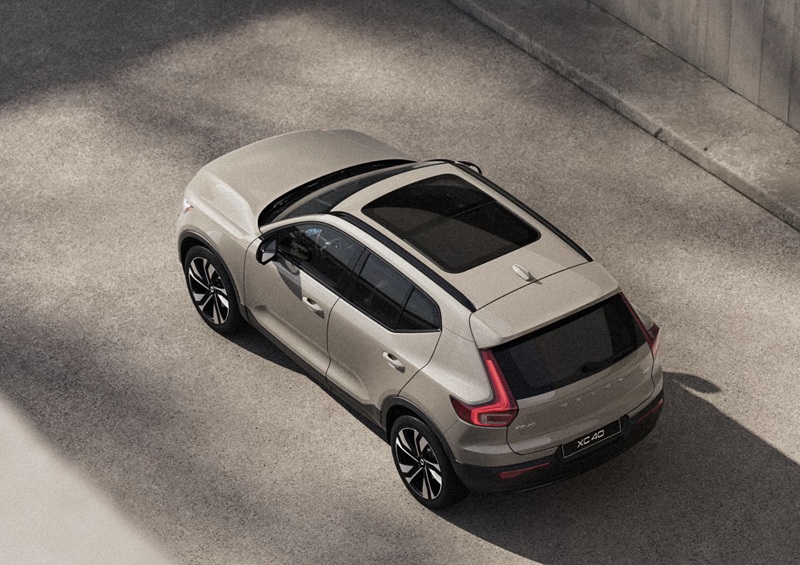
Patrick Volvo Cars - How Google built-in Makes the 2026 Volvo XC40 Feel Effortless Around Elk Grove Village, IL
For many drivers, the best technology is the kind you barely notice—until it saves time, cuts stress, or makes a complicated moment simple. That is the promise of Google built-in in the 2026 Volvo XC40. Around Elk Grove Village, IL, where your day may include a quick run to Elk Grove Technology Park, a loop through Busse Woods, and a dash to a terminal pickup at the airport, having native Google Maps, Google Assistant, and Google Play in your SUV turns complicated into convenient. No phone juggling. No app mirroring hiccups. Just a seamless, voice-driven experience fully integrated into the XC40’s 9-inch center display and 12.3-inch driver display.
Why Native Integration Matters Day to Day
Unlike projection solutions that rely on your phone’s connection and battery, Google built-in runs directly through the XC40’s system. That means faster load times, clean routing on the driver display, and voice commands that work even when your smartphone is tucked away. In practice, it looks like this: you say, “Hey Google, navigate to the Pavilion at Elk Grove,” and your route appears in seconds with traffic-aware recalculations along Arlington Heights Road or Higgins. Need coffee en route? Just ask for a café along the way and add the stop with a tap of the steering wheel control.
Smarter Navigation with Traffic Awareness
Chicagoland traffic ebbs and flows throughout the day. Google Maps in the XC40 adapts in real time. If inbound I-90 tightens up, you will see alternate routing options in the cluster or center screen without fumbling for your phone. For frequent flyers, setting the route to the terminal loop at O’Hare becomes a single voice command. If a friend texts a new restaurant suggestion in Elk Grove Village, a quick “Hey Google, find parking near…” brings up nearby options and helps you glide into a spot without stress.
Voice That Actually Listens
The difference with Google Assistant is conversation-level accuracy. Ask for climate adjustments, call a contact, send a quick text, or queue up a podcast from Google Play, all without taking your hands off the wheel. Because the assistant is native, it taps the XC40’s settings directly—so “Set cabin to 70 degrees” instantly adjusts the climate without extra menus. In traffic, that simplicity is priceless.
And when the week gets long, music and audio are handled just as elegantly. Use your preferred apps from Google Play, then let the available Harman Kardon Premium Sound fill the cabin with rich detail. If you hop between playlists and podcasts, steering wheel controls and voice prompts keep you focused. It is this blend of calm interface and quick responses that makes the technology feel invisible—in the best possible way.
Future-Ready With Over-the-Air Updates
With over-the-air software updates, the 2026 Volvo XC40 can add refinements in the background. New navigation features, interface polish, or enhancements to Google built-in can roll out without a service visit. If you are busy juggling work in Elk Grove Village and weekend plans across the Northwest suburbs, that kind of hands-off improvement keeps your SUV feeling current.
Of course, the XC40 complements Google built-in with smartphone compatibility you already know—Apple CarPlay and Android Auto™—so your favorite ecosystem is always within reach. But when you do not want to plug in, the native experience is faster and simpler.
Tech That Works With Volvo Safety
Navigation clarity pairs naturally with Volvo’s driver support. With BLIS™ helping on lane changes and available 360° view assisting in tight parking near Busse Woods trailheads or crowded shopping centers, the XC40 layers convenience on top of protection. It is moving with confidence, not just speed.
The ergonomic seats designed with input from orthopedic surgeons, the clean Scandinavian layout, and the available PM 2.5 air purifier round out a cabin that feels as smart as it looks. When your daily loop taps into many different parts of Elk Grove Village, an interface that simply understands helps every mile go more smoothly.
Frequently Asked Questions:
Do I need my phone connected to use Google Maps in the XC40?
No. With Google built-in, navigation runs natively on the vehicle’s system, so you can use Maps—even switch routes—without plugging in your smartphone.
Can I control climate and audio with voice?
Yes. Google Assistant can adjust temperature, change fan speed, play music or podcasts, and place calls or messages with natural voice prompts.
Does the driver display show turn-by-turn directions?
Yes. The 12.3-inch driver display can present map guidance and driving aids in a clean, glanceable format so you stay informed with minimal distraction.
What if I prefer Apple CarPlay?
No problem. Apple CarPlay is supported, so you can choose your favorite interface on any given day.
Try It on the Roads You Know
You can get a true feel for Google built-in on familiar streets. Plot a route from Elk Grove Village to a favorite café, ask for a detour, request a temperature change, and cue a playlist—hands-free—all in a single test drive. It is the most convincing way to see how the XC40’s tech reduces friction without adding complexity.
When you are ready to explore, schedule a drive and ask to try Google Assistant tasks you use every day. You may be surprised how quickly it becomes second nature. Patrick Volvo Cars is proud to help you compare features, demonstrate voice controls, and tailor an XC40 to your life—serving Rolling Meadows, Oak Brook, and Elk Grove Village.
Request more 2026 Volvo XC40 information
Categories:
Volvo XC40
 AdChoices